
WordPress 3.3 Beta 1 has finally been released for the curious at heart to get a glimpse as to what’s coming in the final version. There are quite a few visual changes that you should look out for and provide feedback on. Here are a couple things worth noting.
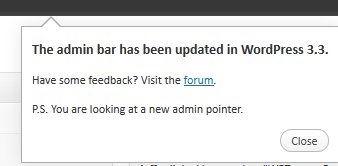
New Feature Pop-ups – After WordPress 3.3 is installed, you’ll see popups that display information pointing users to new features. When testing, see if the popups close upon clicking the close button. Also see if the popups reappear multiple times. There has been an issue with popups and IE7/8 with them not going away but Alex Mills is betting that those have been fixed as of ticket #18693
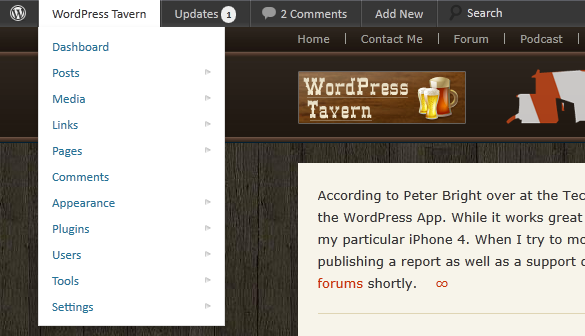
Admin Bar Revamp – The Admin bar now sports a darker color. The biggest changes to the admin bar reside within the rearrangement of menu items. Instead of the username and gravatar aligned to the left side of the bar, it’s now all the way on the right hand side. The search box has been moved to the right of the Add New menu link. Updates has been added as a top menu item. However, your website name now shows up on the far left side of the admin bar and this is where you’ll find all sorts of administrative tasks when you hover your mouse cursor over the link. The dashboard link as well as Appearance has been added to this menu item along with an assortment of other options. The drop down menus also look a lot like their Administration panel counterparts compared to the 3.2 version. Last but not least, on the left side of the admin bar, there is a small WordPress icon. This icon acts like the HELP button in typical software. From here, you can get information about the specific version of WordPress, Freedoms, Credits, links to WordPress.org, the support forums, documentation and giving feedback.
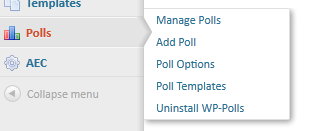
Flyout Menus – All of the top level links within the left menu now have Flyouts where as previously, Flyouts only occurred when the menu was collapsed.
Drag And Drop Uploading – I think users will be surprised the most by the new upload media screen. Thanks to something called plUpload which has been added to WordPress 3.3, we can now drag multiple files into the editor. This has also allowed the dependence on Flash within the uploader to disappear as support for HTML 5, Flash, and Silverlight are supported with plUpload. I’ve given it a try with 5 images and it worked great. Users who upload photo sets to WordPress are going to love this enhancement.

One Media Button – In WordPress 3.2.1, there are 4 icons within the post editor that allow you to add some type of media to a post. Images, Audio, Video, and strangely enough, an icon named Media. In WordPress 3.3, all of those icons have been replaced by one icon labeled Media. From here, you simply drag whatever media files you have into the uploader. No more picking and choosing since the uploader is smart enough to distinguish between different media types. You can add your typical meta data after the media has been uploaded.
WordPress 3.3. will have more to offer than what I have listed here but if you plan on beta testing the new version, you now have a couple things to play around with. If you come across something you think is broken or not working as you think it should, the best thing you can do is report it within the Alpha/Beta section of the WordPress.org Support forums while being as descriptive as possible.
I love this release. I’ve been using it on my live site for the past month and have been really happy with the changes.
I don’t see any annoying bloaty feature creep junk in this release, just gradual improvements and code rewrites to improve what is already there. I wish all releases took this approach.
The new media uploader in particular kicks some serious butt, yet doesn’t added any extra functionality. They took what was already there, and made it better. I want more of that :)