
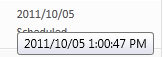
Since publishing more content for WPTavern, I’ve become quite fond of the ability to schedule posts into the future. However, one gripe I’ve had is not being able to easily identify the time a post has been scheduled to be published. I was hoping that at some point in the future, on the All Posts administration panel that I would be able to see the time the post was going to go live under the term Scheduled, instead of having to go into the edit panel for the post to see the exact time. My mouse cursor must have been at the right place at the right time because I discovered tonight that if I hover my mouse cursor over the date the post has been scheduled, a tool-tip will appear that gives me the exact time.
It’s little things like this that I really appreciate.
I used to have a plugin that would put a calendar of scheduled posts on the admin side. Just like a google calendar monthly thing.